> ## Documentation Index
> Fetch the complete documentation index at: https://docs.onyx.app/llms.txt
> Use this file to discover all available pages before exploring further.
# Drupal Wiki
> Access knowledge from your Drupal Wiki instance
## How it works
The Drupal Wiki connector indexes content from your Drupal Wiki instance including spaces, pages,
and optionally attachments.
The connector fetches all accessible content upon initial setup and then performs incremental updates to keep your
knowledge base synchronized.
The connector respects the permissions of the provided API token, indexing only content that the token has access to,
whether public or private.
## Setting up
### Authorization
You will need an API access token for your Drupal Wiki instance.
The token must start with `pat:` (Personal Access Token).
Navigate to your Drupal Wiki instance
Follow the documentation to generate an access token:
[https://help.drupal-wiki.com/node/605#2-Zugriffs-Token-generieren](https://help.drupal-wiki.com/node/605#2-Zugriffs-Token-generieren)
Ensure the REST API interface is available in your Drupal instance
Copy the generated API token (it should start with `pat:`)
The API token determines which content will be accessible to Onyx.
Only content that the token user has permission to access will be indexed.
### Indexing
Navigate to the Admin Dashboard and select the **Drupal Wiki** connector
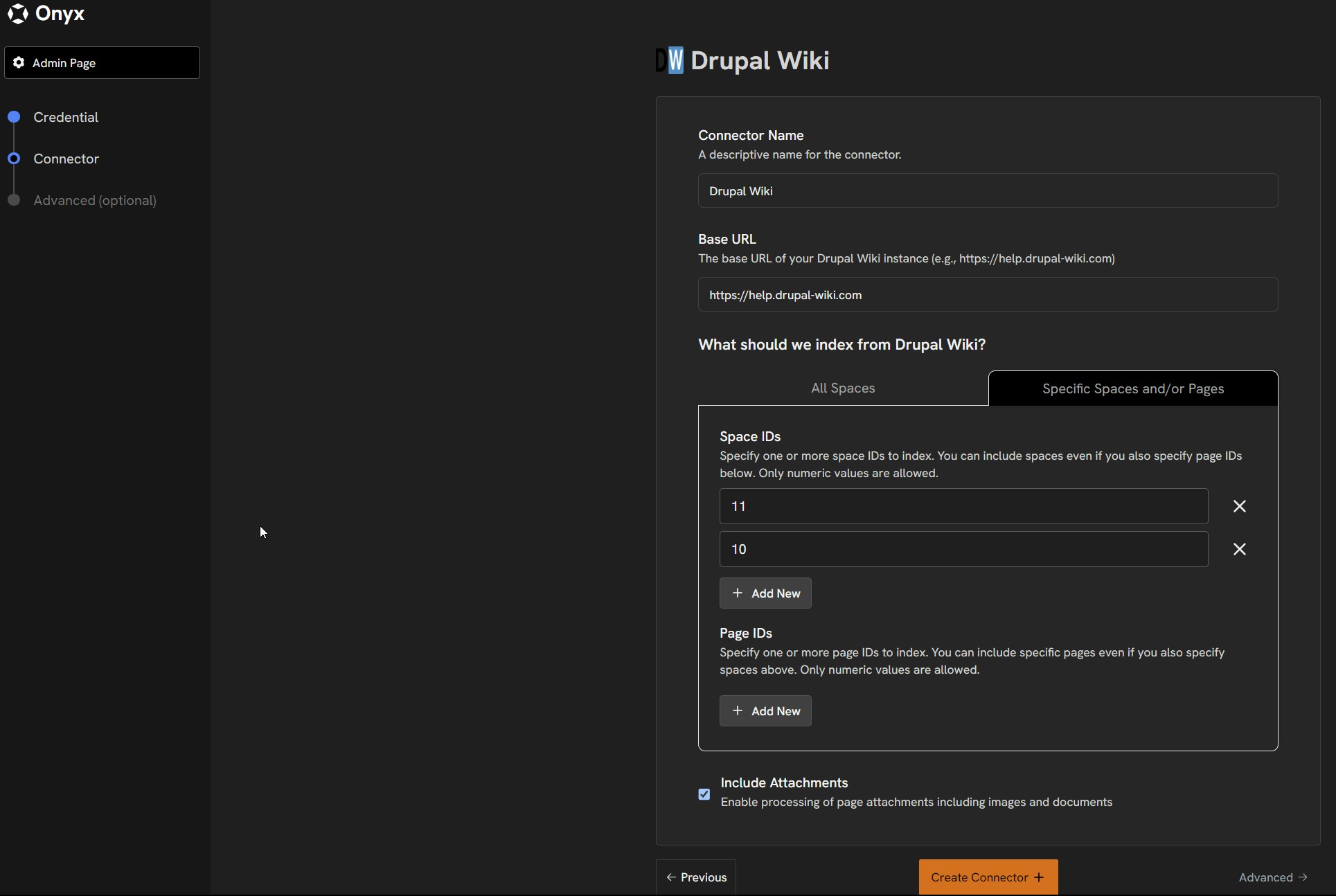
In **Step 1**, provide your Drupal Wiki configuration:
* **API Token**: The access token you generated (starting with `pat:`)
In **Step 2**, choose your indexing scope:
* **Base URL**: The base URL of your Drupal Wiki instance (e.g., `https://help.drupal-wiki.com`)
* **All Content**: Index all spaces and pages accessible to your API token
* **Specific Spaces**: Enter specific Space IDs to index only certain areas
* To find Space IDs, refer to: [https://help.drupal-wiki.com/node/606](https://help.drupal-wiki.com/node/606)
* **Specific Pages**: Enter specific Page (Node) IDs to index only certain pages
Configure additional options:
* **Include Attachments**: Check this to also index file attachments (PDF, DOC, DOCX, XLS, XLSX, PPT, PPTX, TXT,
HTML, MD, CSV)
Click the `Connect` button!
Your Drupal Wiki content will be indexed and kept up to date with incremental synchronization.
 ## Supported Content Types
The Drupal Wiki connector indexes the following content:
* **Spaces**: Organizational units within your Drupal Wiki
* **Pages**: Individual wiki pages with HTML content (converted to plain text)
* **Attachments** (optional): Various document formats up to 10MB
## Technical Details
* **API Usage**: Uses Drupal Wiki's REST API endpoints
* **Synchronization**: Supports incremental updates for efficient syncing
* **Content Limits**: 10MB for attachments, 600,000 characters for text content
* **Deployment Support**: Works with both self-hosted and cloud-hosted Drupal Wiki instances
## Permission Syncing
The connector automatically respects your Drupal Wiki's permission system.
Content access is determined by the API token's permissions,
ensuring that only authorized content is indexed and searchable within Onyx.
## Supported Content Types
The Drupal Wiki connector indexes the following content:
* **Spaces**: Organizational units within your Drupal Wiki
* **Pages**: Individual wiki pages with HTML content (converted to plain text)
* **Attachments** (optional): Various document formats up to 10MB
## Technical Details
* **API Usage**: Uses Drupal Wiki's REST API endpoints
* **Synchronization**: Supports incremental updates for efficient syncing
* **Content Limits**: 10MB for attachments, 600,000 characters for text content
* **Deployment Support**: Works with both self-hosted and cloud-hosted Drupal Wiki instances
## Permission Syncing
The connector automatically respects your Drupal Wiki's permission system.
Content access is determined by the API token's permissions,
ensuring that only authorized content is indexed and searchable within Onyx.