> ## Documentation Index
> Fetch the complete documentation index at: https://docs.onyx.app/llms.txt
> Use this file to discover all available pages before exploring further.
# Slab
> Access documentation from Slab
## How it works
Slab is a wiki tool where the pages are called Posts. Onyx indexes the post **titles** and **contents**.
The Posts are pulled in and updated every **10** minutes.
## Setting up
### Authorization
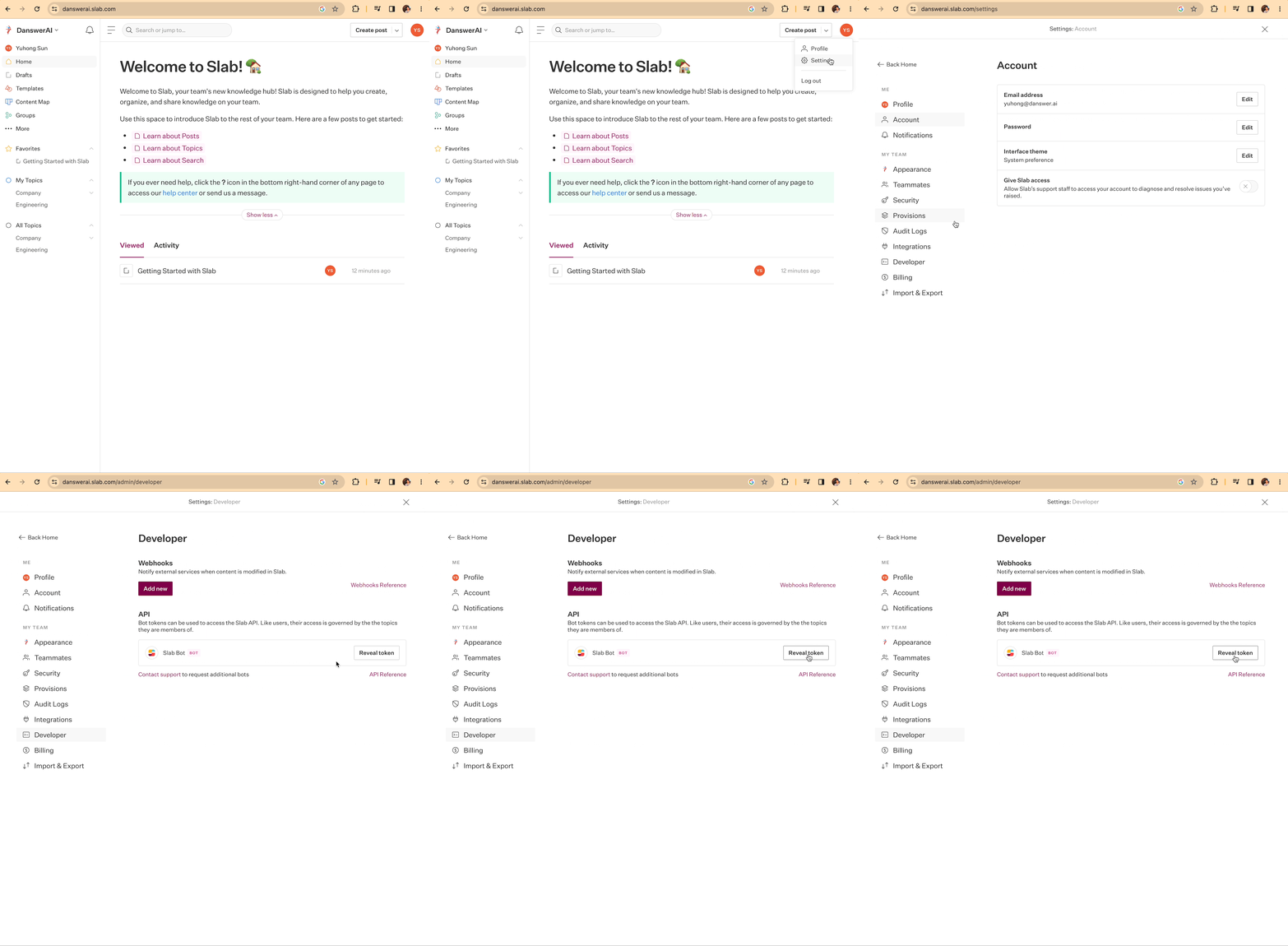
Follow the video below to fetch your **Slab Bot Token**.
 ### Indexing
Navigate to the Admin Panel and select the **Slab** Connector
In **Step 1**, provide the **Slab Bot Token** from above
In **Step 2**, provide the Slab URL (e.g., `onyxai.slab.com`)
Click `Connect` to begin indexing
### Indexing
Navigate to the Admin Panel and select the **Slab** Connector
In **Step 1**, provide the **Slab Bot Token** from above
In **Step 2**, provide the Slab URL (e.g., `onyxai.slab.com`)
Click `Connect` to begin indexing