

Overview
Onyx is a set of containers that you can deploy on any infrastructure and at any scale.System Architecture
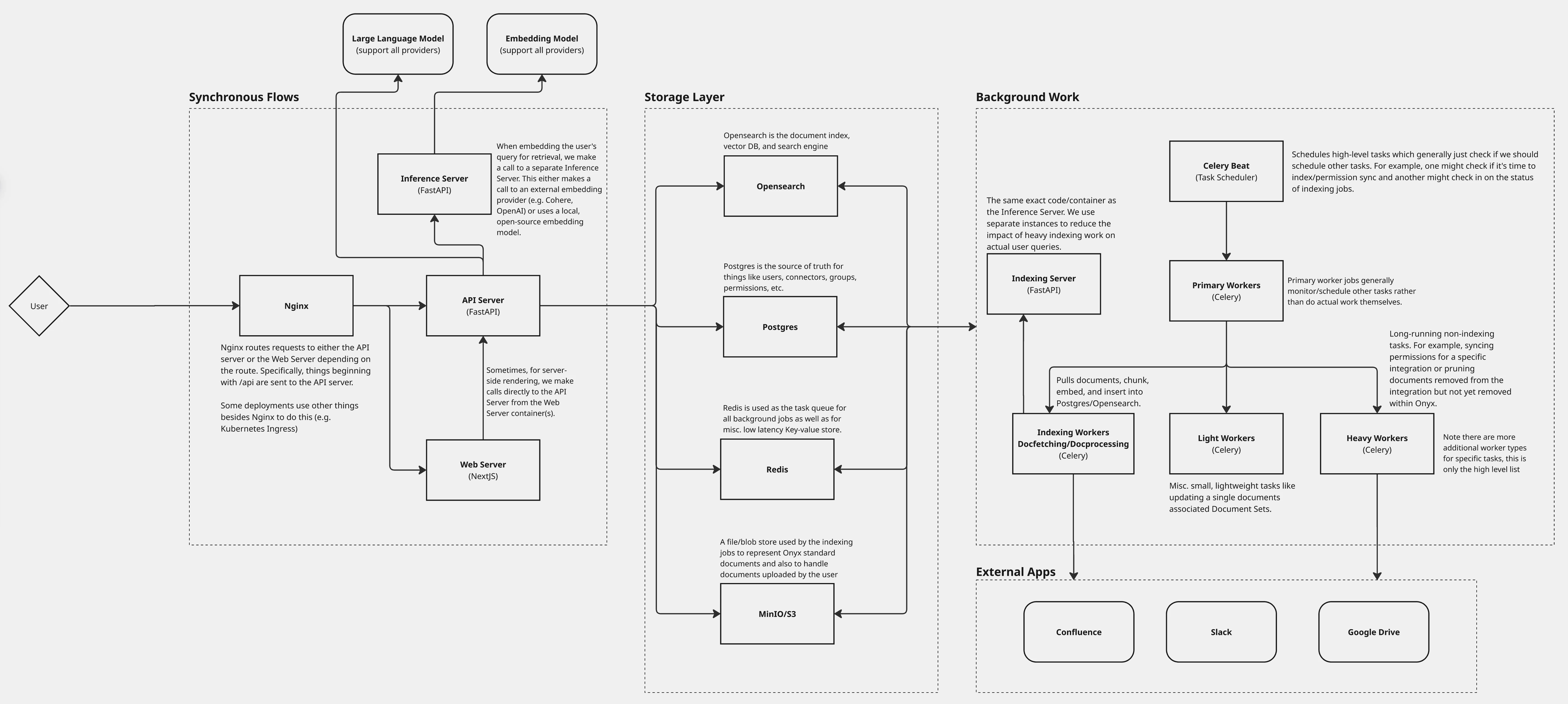
Core Components
Application Layer
- Web server: Next.js web application that provides the Onyx user interface
- API Server: Python FastAPI server that handles business logic and requests
- Background Workers: Python workers that handle asynchronous jobs such as fetching and indexing documents, syncing permissions, and running scheduled Craft tasks
- MCP Server: exposes Onyx search to external LLM clients that authenticate with a personal access token or API key
Model Servers
- Inference Model Server: embeds user queries at search time so that Onyx can retrieve matching chunks
- Indexing Model Server: a dedicated model server that embeds documents during indexing. It keeps heavy indexing workloads away from live query traffic
Data Layer
- Relational Database: Postgres database for application data, user sessions, and system state
- Search Engine: OpenSearch for keyword (BM25) search and vector search over document chunks
- In-Memory Cache: Redis for sessions, task queues, and short-lived state
- File Store: the object store (SeaweedFS) for user uploaded files and documents pulled from connectors
Infrastructure Layer
- Request Router: Nginx reverse proxy for request routing. Kubernetes deployments typically use an Ingress instead
Optional Components
- Code Interpreter: a separate container that runs the Python code the LLM writes. Admins can turn it off under Admin Panel > Code Interpreter
- Craft sandboxes and sandbox proxy: per-user sandboxes for Craft, plus a proxy that controls their network egress. See Craft Architecture