

Overview
Onyx can connect to your Slack workspace and answer questions. You can configure OnyxBot to respond to certain types of messages, in specific channels, and with selected data from your index.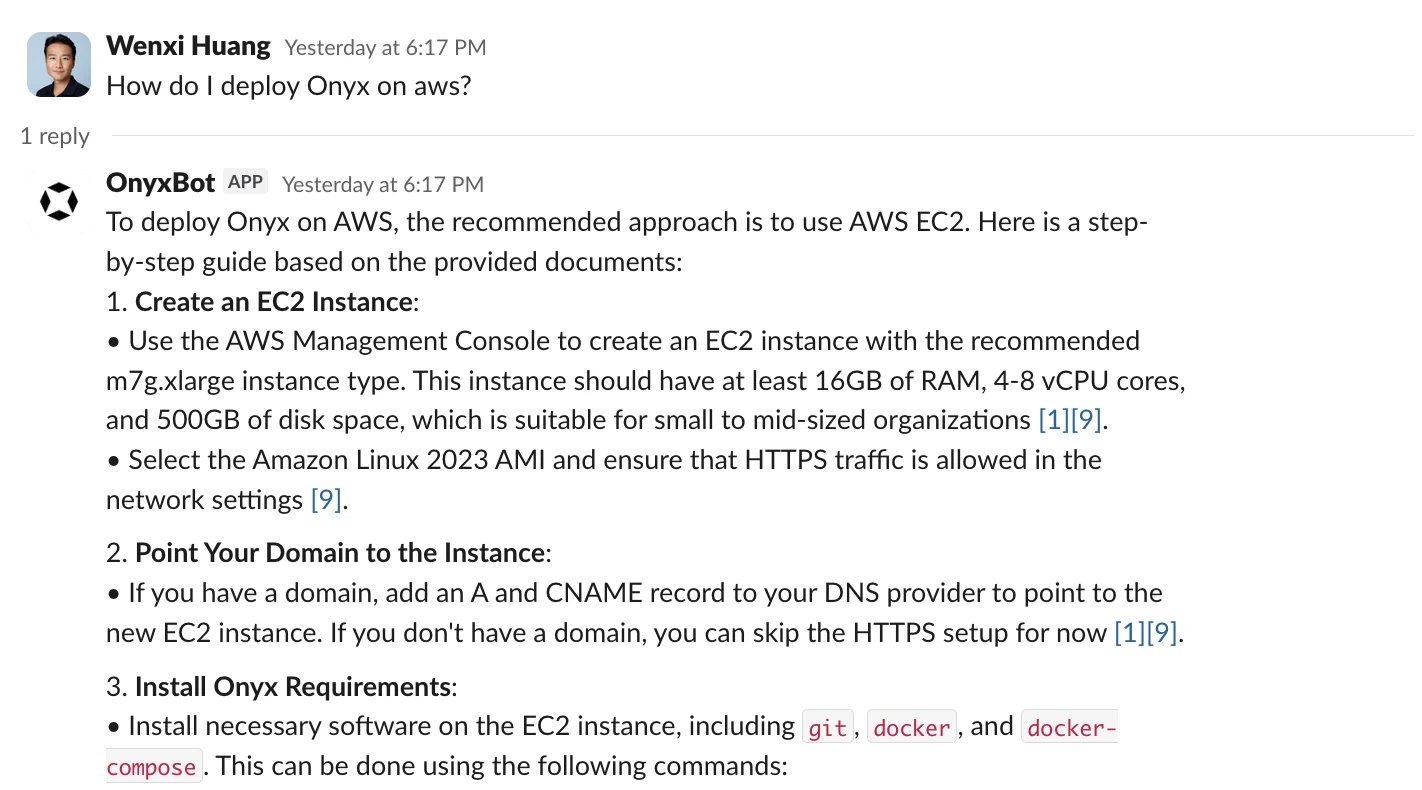
Setup
You must be an admin of the Slack workspace to set up the Slack bot.
1
Create a new Slack App
Navigate to the Slack App Dashboard
and click Create New App → From a manifest.Select the workspace you want to connect to Onyx.
2
Use the YAML manifest
Click the YAML tab and paste the following manifest into the box:Click Create.
YAML Manifest
3
Generate an App Token
Scroll down to the App-Level Tokens section and click Generate Token and Scopes.Give your token a name, add the 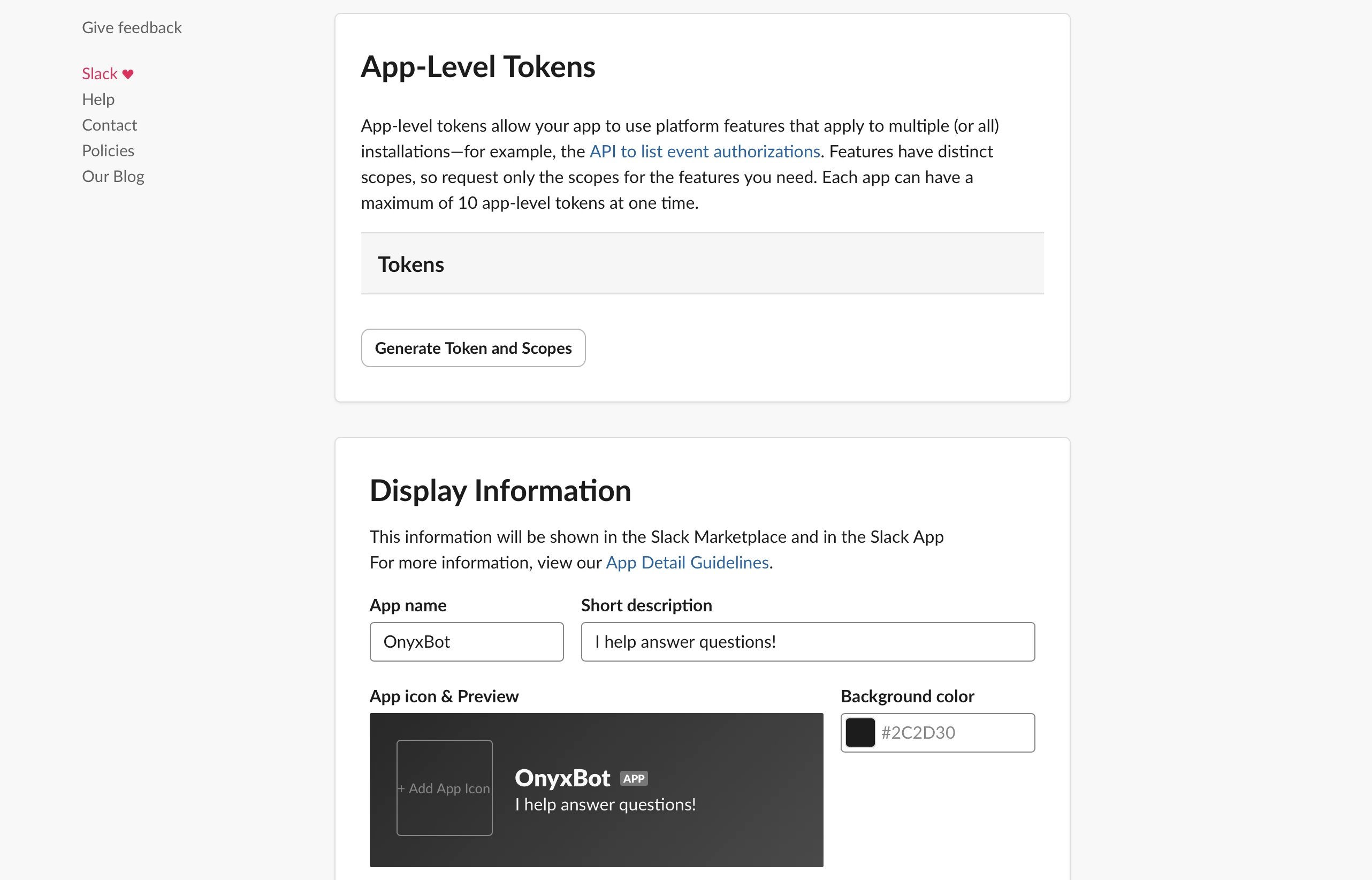
connections:write scope to the app-level token and click Generate.
Save this token for later.4
Install the Slack App
Navigate to the OAuth & Permissions tab and click Install to Workspace.Copy the Bot User OAuth Token and User OAuth Token (Recommended) and save it for later.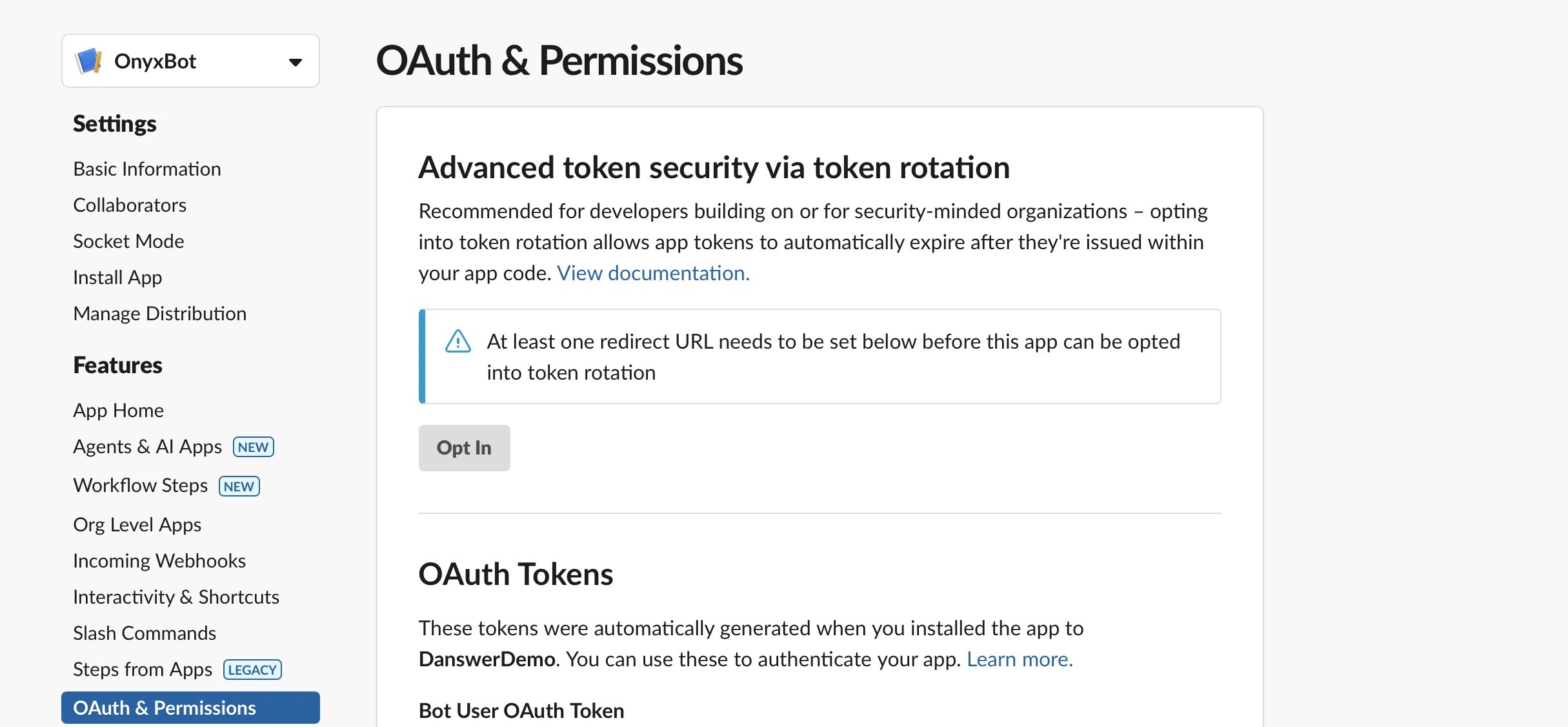
Onyx does not currently support token rotation.
5
Setup Onyx for the Slack Bot
Open Admin Panel → Slack Integration and click New Slack Bot.Name the bot. Enter the Slack Bot Token, Slack App Token, and Slack User Token (optional, recommended)
and click Create. Onyx validates the tokens and connects to Slack over Socket Mode,
so your deployment does not need a public URL.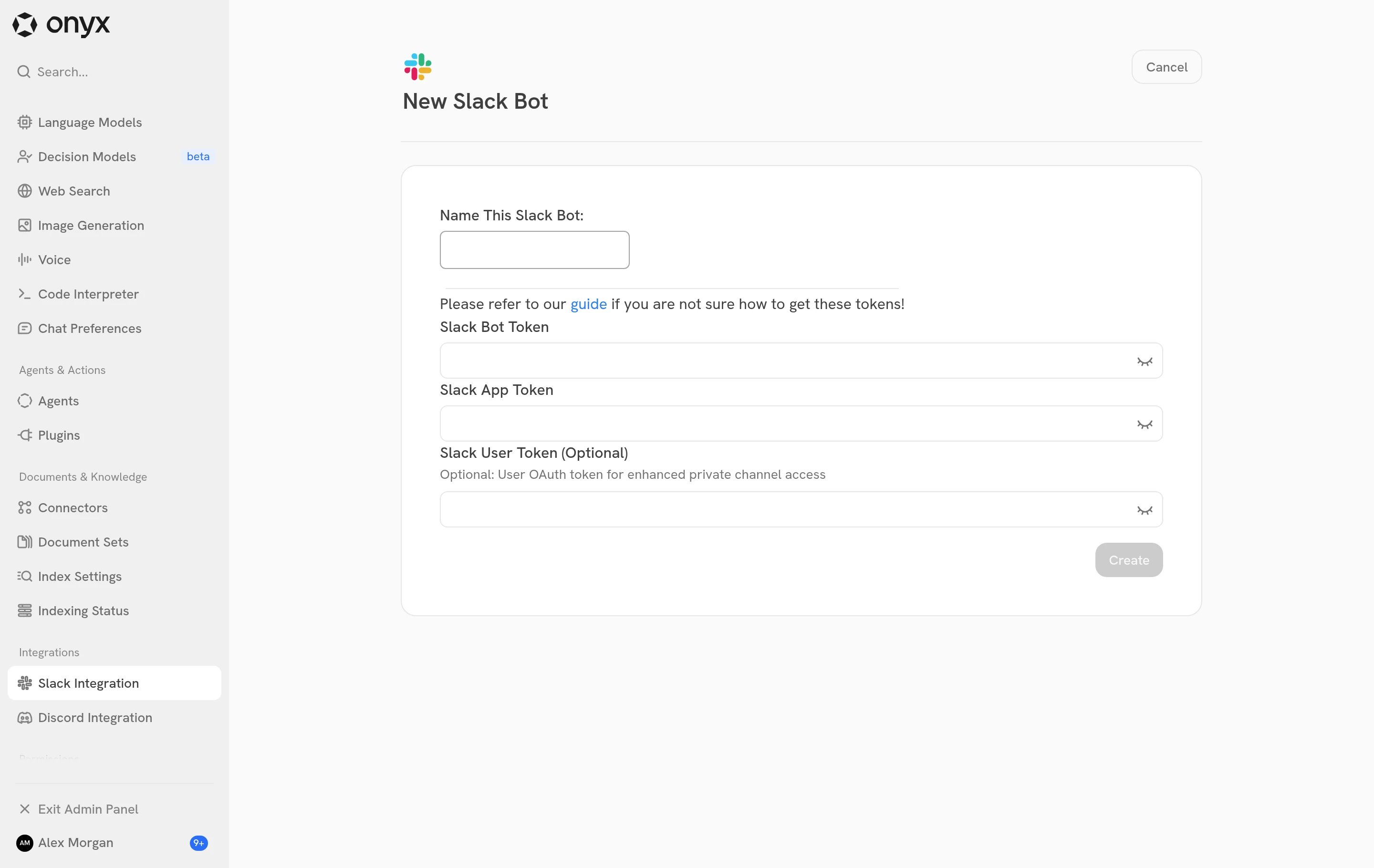
6
Configure the Slack Bot's Behavior
The Default Configuration sets the bot’s behavior for all channels and DMs.
By default the bot only answers when it is tagged or in a DM.
A Channel Configuration overrides the default configuration for that channel.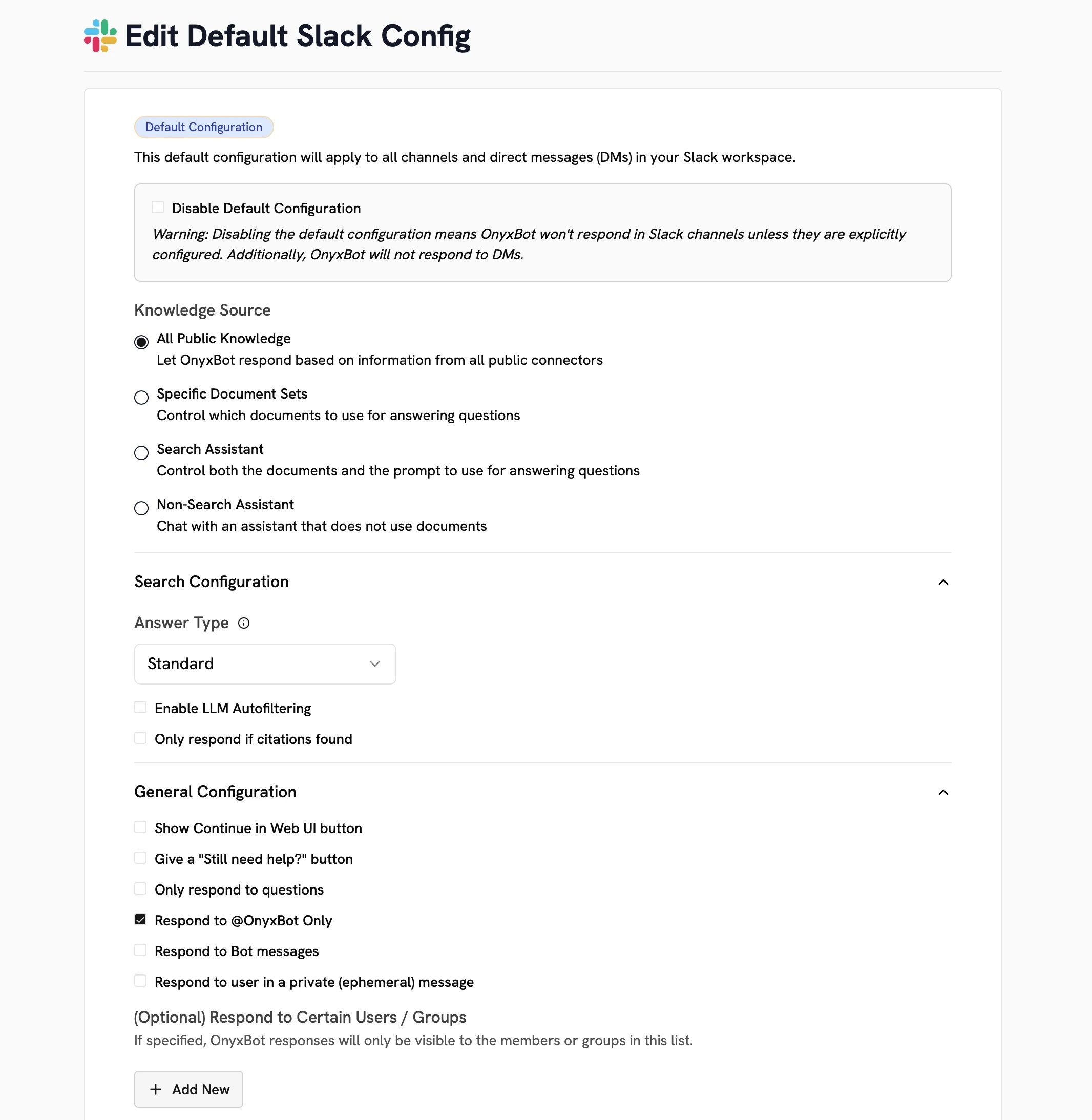
Channel Configuration Options
For the default configuration and for each channel, you can set:- Agent: the Agent that answers in the channel. Use an Agent with a narrow knowledge scope so the bot does not answer from private data.
- Document Sets: limit the search to selected Document Sets.
- Respond to tags only: answer only when a user tags @OnyxBot or sends a DM, instead of every message.
- Only respond if citations found: stay silent when the answer has no supporting documents.
- Respond to user in a private (ephemeral) message: show the answer only to the person who asked. They can click Show everyone to share it.
- Respond to specific users or groups: limit who can trigger the bot in the channel.
- Follow-up tags: Slack users or groups to notify when a user asks for a human follow-up.
- Standard answer categories (Business plan and higher): post a predefined answer when a message matches a keyword.
How to use the Onyx Slack Bot
There are a few ways to chat with the Onyx Slack bot:Tag the bot with your question
Tag the bot with your question
Use a slash command
Use a slash command
Send a message in a channel with the bot added
Send a message in a channel with the bot added
Direct message the bot
Direct message the bot
Advanced Configuration (Self-Hosted)
Self-hosted deployments can set environment variables on the background worker that runs the Slack bot to change its behavior. You can find the full list of configuration options in the Onyx GitHub.ONYX_BOT_NUM_RETRIES
ONYX_BOT_NUM_RETRIES
Number of retry attempts for generating an answer before failing.Default:
5 (int)ONYX_BOT_NUM_DOCS_TO_DISPLAY
ONYX_BOT_NUM_DOCS_TO_DISPLAY
Number of documents shown under “Reference Documents”.Default:
5 (int)ONYX_BOT_DISABLE_DOCS_ONLY_ANSWER
ONYX_BOT_DISABLE_DOCS_ONLY_ANSWER
Disable responses that only show “Reference Documents” when the LLM cannot answer.Default:
false (bool)ONYX_BOT_REACT_EMOJI
ONYX_BOT_REACT_EMOJI
Emoji reaction shown while Onyx considers a message.Default:
eyes (str)ONYX_BOT_FOLLOWUP_EMOJI
ONYX_BOT_FOLLOWUP_EMOJI
Emoji used to suggest that the user may need more help.Default:
sos (str)ONYX_BOT_FEEDBACK_VISIBILITY
ONYX_BOT_FEEDBACK_VISIBILITY
Visibility for AI answer feedback submitted to OnyxBot. Options:
private (only the clicking user),
anonymous (public but anonymous), public (public with username).Default: private (str)NOTIFY_SLACKBOT_NO_ANSWER
NOTIFY_SLACKBOT_NO_ANSWER
If enabled, OnyxBot sends a brief apology message when it cannot find an answer.Default:
false (bool)ONYX_BOT_DISPLAY_ERROR_MSGS
ONYX_BOT_DISPLAY_ERROR_MSGS
Show brief error explanations when something goes wrong answering a question.Default:
false (bool)ONYX_BOT_MAX_QPM
ONYX_BOT_MAX_QPM
Maximum questions per minute the bot can answer. Set to
0 or leave unset for uncapped.Default: uncapped (int)ONYX_BOT_MAX_WAIT_TIME
ONYX_BOT_MAX_WAIT_TIME
Maximum time in seconds a question will wait in the queue before timing out.Default:
180 (seconds; 3 minutes)ONYX_BOT_FEEDBACK_REMINDER
ONYX_BOT_FEEDBACK_REMINDER
Minutes after which a reminder DM is sent to request feedback on an answer. Set to
0 to disable.Default: 0 (disabled; 0 minutes)ONYX_BOT_RESPONSE_LIMIT_PER_TIME_PERIOD
ONYX_BOT_RESPONSE_LIMIT_PER_TIME_PERIOD
Number of responses OnyxBot can send within a time window. Set to
0 to disable the limit.Default: 5000 (int)ONYX_BOT_RESPONSE_LIMIT_TIME_PERIOD_SECONDS
ONYX_BOT_RESPONSE_LIMIT_TIME_PERIOD_SECONDS
Length of the response limit window in seconds.Default:
86400 (seconds; 24 hours)