

This permission system is available in Onyx v4.7 and later. If you are using an older version,
see Users and Groups before v4.7.
The Permission Layers
Think of permissions as layers. Each layer can add more access for a user. The pyramid widens as access expands:- Service account with no group is the narrowest level. A service account that belongs to no group can post to chat, but it cannot search and cannot reach any admin page. Only service accounts land here; regular users always start in a group.
- Basic gives users core workspace access: chat, search, and personal use.
- Group Manager adds management access for one specific group’s members and resources.
- Group permissions grant organization-wide permissions to everyone in that group.
- Admin has full access across the workspace.
The layers show how far access reaches, not a strict ranking.
A Group Manager and a group permission are different mechanisms:
a Group Manager’s access always stays inside the groups they manage,
while a group permission applies across the whole organization. Depending on what you grant,
one is not automatically “more” than the other.
Default Groups
Onyx includes two default groups:
Standard users are assigned to default groups based on their access level. Service accounts, such as API keys,
can also be assigned to groups when configured.
Custom groups let you grant specific permissions to the users in that group.
Custom groups and configurable group permissions are an Enterprise Edition feature.
Service Accounts and Groups
A service account gets its access the same way a user does: from the groups it belongs to. You choose those groups in the Groups selector when you create the API key. A service account that belongs to no group can post to chat, but it cannot search and it cannot reach any admin page. This is the narrowest level in the permission layers. To give a service account more access, add it to a group. It then receives that group’s permissions exactly as a user would.How Onyx Calculates a User’s Permissions
Onyx checks every group a user belongs to and combines the permissions from those groups. If the same user is also made a Group Manager from a group detail page, Onyx adds that scoped manager access too. For example, say Priya has these assignments:
Priya receives all three sets of access. The Analytics Viewers group does not limit her Engineering manager access,
and her Engineering manager access does not remove anything from Basic.
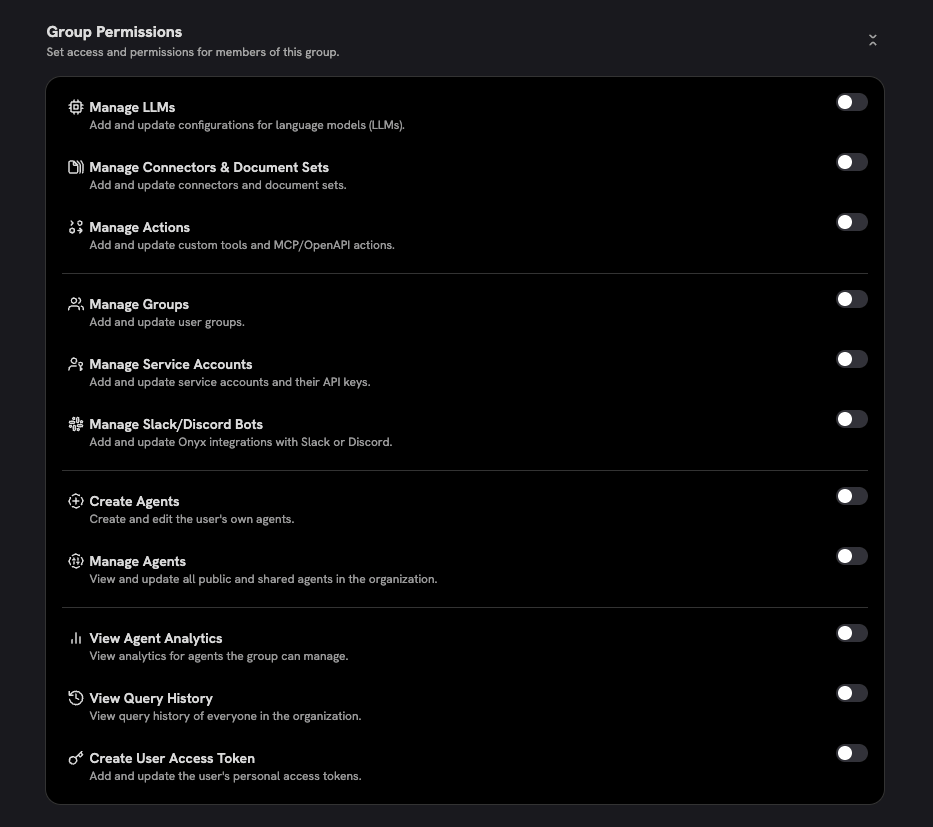
Group Permissions
Group permissions are granted to a group and apply to every member of that group. Use group permissions when you want a team to have the same organization-wide capability. Common examples:- Give an IT administrators group Manage Connectors & Document Sets so they can manage all connectors.
- Give a model operations group Manage LLMs so they can configure language models.
- Give an analytics group View Query History so they can review query activity.
- Give a developer platform group Manage Actions so they can maintain workspace actions and MCP servers.
Group Managers
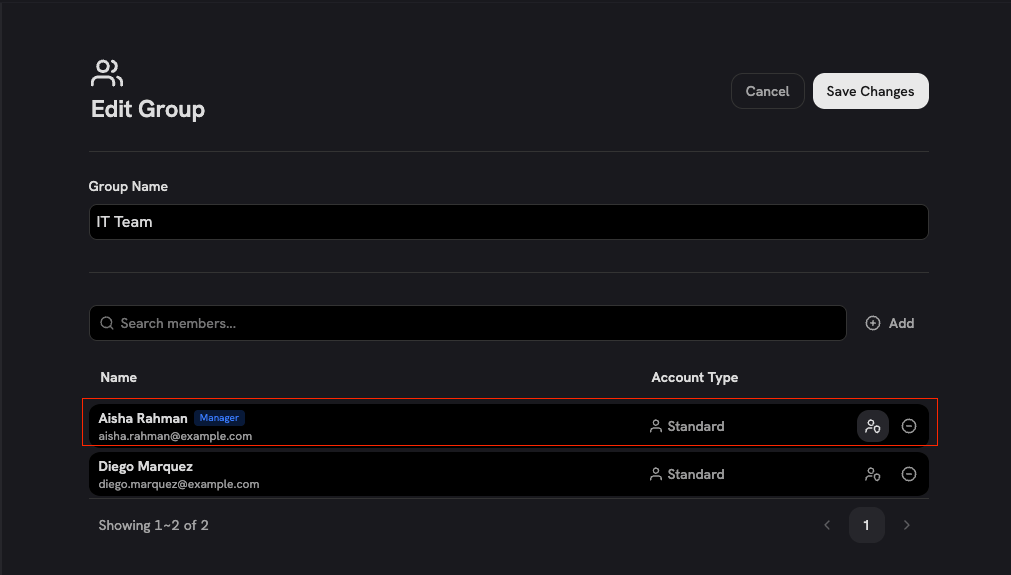
A Group Manager is a user who can manage one specific group from that group’s detail page. This is the scoped permission model in Onyx. Group Managers are useful when a team lead should manage their own team’s users and resources, but should not receive organization-wide admin powers. Scoped to the group they manage, a Group Manager can:- Add and remove members from that group.
- Manage connectors and document sets shared only with that group.
- Manage agents shared only with that group.
- Manage actions through the agents shared with that group.
- Manage resources that are not shared with a group they manage.
- Make a resource public.
- Share a resource with a group they do not manage.
- Grant organization-wide permissions.
Group Permission vs. Group Manager
This is the most important distinction:
If you want someone to manage only one group’s resources, make them a Group Manager from that group detail page.
Do not grant a group-wide Manage permission, because group permissions are organization-wide.
Available Group Permissions
The following permissions can be assigned to custom groups:View Agent Analytics is not scoped through Group Manager access. The permission can be granted to a group,
but agent-level analytics still require the user to own the agent unless the user also has Manage Agents.
Community Edition has no group permission configuration, so Create Agents is available to everyone.
The permissions in this table are configured per group in Enterprise Edition.
Document Access Is Separate
Permissions decide what a user can do in the Admin Panel and which resources they can manage. Document visibility is still controlled by connector and resource access settings. Connectors can be:- Private: Visible only to the creator, plus any users or groups explicitly granted access.
- Public: Visible to all Onyx users.
- Auto Sync Permissions: Restricted using permissions synced from the source system.
Common Setups
Quick Checklist
- Put regular users in Basic.
- Put full administrators in Admin.
- Use group permissions only when the access should be organization-wide.
- Use Group Manager when the access should stay scoped to one group.
- Confirm connector access settings separately, because document visibility is enforced outside the group permission list.
Frequently Asked Questions
Do permissions add together or override each other?
Do permissions add together or override each other?
Permissions add together. If a user belongs to multiple groups,
Onyx combines the permissions from all of those groups.
Membership in one group does not remove access granted by another group.
Are group permissions scoped to that group?
Are group permissions scoped to that group?
No. Group permissions are organization-wide. Only Group Manager access is scoped to a specific group.
When should I use Group Manager instead of a group permission?
When should I use Group Manager instead of a group permission?
Use Group Manager when one person should manage only one group’s members and resources.
Use a group permission when everyone in that group should receive an organization-wide capability.
Can a Group Manager make a resource public?
Can a Group Manager make a resource public?
No. Group Managers cannot make connectors, document sets, or agents public,
and they cannot share resources with groups they do not manage.
Does View Agent Analytics show analytics for all agents?
Does View Agent Analytics show analytics for all agents?
No. View Agent Analytics lets users view analytics for agents they own.
Users with Manage Agents can view analytics for all agents.
Does a management permission show all documents in search?
Does a management permission show all documents in search?
No. Document visibility is controlled separately by connector access settings: Private, Public,
and Auto Sync Permissions.
What are the default groups?
What are the default groups?
The default groups are Basic and Admin.
Do service accounts use group permissions?
Do service accounts use group permissions?
Yes. Service accounts, such as API keys, are assigned to groups and receive permissions from those groups,
exactly like a user. You pick the groups in the Groups selector when you create the key.
A service account that belongs to no group can post to chat,
but it cannot search and it cannot reach any admin page. Bot, anonymous,
and external placeholder accounts are system-managed and are not managed like regular users.
What happens if a user is not in any group?
What happens if a user is not in any group?
They have no permissions. All access in Onyx comes from group membership.
How do anonymous users fit into permissions?
How do anonymous users fit into permissions?
Anonymous users only exist when anonymous access is enabled, and they can only reach the chat surface.
They have no account and belong to no group,
so they cannot be given permissions and never appear in the permission layers as a separate level.
Can I create custom roles?
Can I create custom roles?
Yes. Create a custom group and assign the permissions that match the role you want.